
Mozy Woes on Mac

September 4th, 2009

Mozy has been working fine on my Mac for about 6 months (aside from the massive memory usage it requires during backup), but starting about a week ago, I can’t make Mozy finish (or even start) a backup. I’ve tried uninstalling it, removing all configs, reinstalling it, using the shipped config defaults, and I still get this error in /Library/Logs/Mozy.log:

INF (backup) Starting backup
INF (backup) Using 108.7 MB of memory
INF (backup) User ID is [snipped for paranoia's sake]
INF (backup) Checking for update
INF (backup) Connecting to [snipped for paranoia's sake]
INF (backup) Version is up-to-date (1.4.3.3)
INF (backup) Adding new history entry
INF (backup) Cleaning up temporary files
INF (backup) Loading encryption key
INF (backup) Loading machine information ...
INF (backup) Connecting to [snipped for paranoia's sake]
INF (backup) Loading configuration from the server
INF (backup) Connecting to [snipped for paranoia's sake]
INF (backup) Fetching the manifest hash from the server
INF (backup) Connecting to [snipped for paranoia's sake]
INF (backup) Server version is 1.3.0.19
INF (backup) Building backup set
ERR (backup) Churn is not running, exiting backup
INF (backup) Cleaning up, finishing
INF (backup) Updating existing history entry
INF (backup) Finished backup (Client error)
INF (backup) Backing up history
INF (backup) Using 108.9 MB of memory
INF (backup) Ending backup

Sometimes I see this as well:

ERR (churn) Failed to scan files, stopping: database is locked

What is “Churn”? What database is locked? I am running Time Machine as well. Does that matter? Any ideas out there? I know some of you used to work at Mozy. Does any of this ring familiar?

On another note, does anyone else notice that Mozy Backups take a lot of memory on Mac OS X?
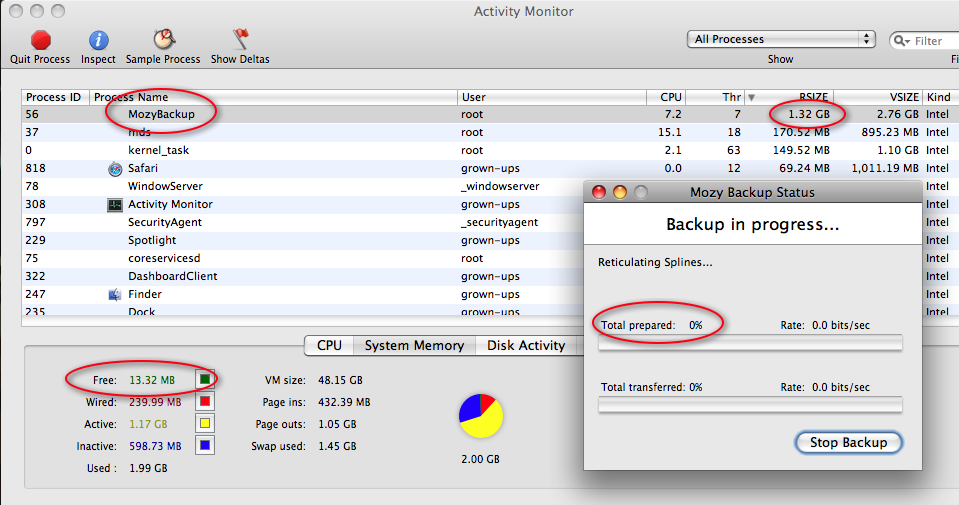

(click for bigger picture)

Mozy sits this way for hours on my Mac in the rare cases that it does actually get a backup started.

73 Responses to “Mozy Woes on Mac”

  1. Beeman Says:

    Exact same problem here. And I tried the same thing: uninstall, reboot, download, install, rebuild backup set, and backup. Looks like it did a successful backup of 1 file (a mozy file) first, but then choked. Have you talked to support about this?

  2. Dave Says:

    No I haven’t emailed support about it. I was hoping it was such a painfully obvious issue that they would already know about it. Perhaps I should email them anyway. Have you?

  3. Nate Says:

    I emailed their support today because I’m having the same trouble you are. Hopefully I’ll get an answer tomorrow.

    2009-09-07 22:49:04.772 MozyBackup[625] ERR (backup) Churn is not running, exiting backup

  4. walter Says:

    Ditto- same ‘churn’ error, we’ve installed the newest version which should fix any issues with Time Machine, but still can’t start a backup becuase of this ‘churn is not running’ ‘churn not started’ error.

    I’ll also open a ticket- but if you get a reply, please post the solution.

  5. Dan Reese Says:

    Hi,

    Just wanted to respond by saying that we are improving Mozy’s memory usage for our next release. We overlooked one key area in our testing for the 1.4 release and have since corrected several “high memory usage” situation. Sorry about that.

    The “Churn is not running, exiting backup” error indicates that something went wrong earlier, likely before you started your backup. There are two things that we know of that can cause this (we have fixes for both). If you could send your log file to dan at mozy dot com, I’d love to see the exact cause of your particular issue.

    Thanks,
    Dan Reese
    Mozy, Inc.

  6. Michael Says:

    Dan Reese,

    You stated that there are a couple fixes for this issue. I am having the exact same problem that has been described, and I have an open Mozy support case. I have tried reinstalling and reconfiguring the backup sets, but I still am getting the “churn is not running” error. What are the fixes and how do I go about getting them?

  7. Dave Says:

    Dan,

    Thanks for the info! I have apparently discovered a method for bypassing the support staff. Just kidding of course. Your support staff is great, but when I asked them about the memory issue, they asked me to install a Mac OS X memory utility and an old version of Mozy Client. I didn’t have a few free hours to do that (since it takes Mozy a *long* time to re-discover all the files to backup).

    I have uninstalled Mozy for now (and deleted the logs, d’oh!), but I will re-install it, enable debug logging, and send you my Mozy.log.

    I do have an unrelated question for you Dan: When Time Machine starts a backup, it takes only a few seconds to discover all the changed files, but when Mozy starts a backup, it takes hours (I start Mozy backups each night at Midnight for this reason). Are you doing a brute force crawl through every file?

    –Dave

  8. Katie Brandt Says:

    A competitor of Mozy that is great with Mac’s and iphones is egnyte. Dave have you seen egnyte before? It has some great features.

  9. Dan Reese Says:

    The fixes are in our 1.5 release, which should be coming out soon. If you are interested in our beta program, you can sign up here:

    http://mozymacbeta.questionpro.com/

    If you are running Tiger/10.4, then another thing that will help is to restore the list of default backup sets (using the gear icon at the bottom of the list). We’ve tweaked the definitions to avoid a potential conflict.

    On the issue of bypassing Support, you’re welcome to contact me. I’m an engineer interested in fixing the Mac software. I can’t help much with account issues or Windows issues or connection isssues or…well the list goes on. :)

    –Dan

  10. Payton Says:

    Dan…I’m getting a bit frustrated myself. I’m having trouble getting Mozy for the Mac to backup. It did it when I was using the free trial and since going to pay, it won’t do anything.

    I did what you said for Tiger and it finally recognized my files but when I start a backup, I keep getting “Client error (MozyClientError)”. Again, this is getting frustrating and I’m wondering if I should go with someone else. Especially if Mozy is a memory hog.

  11. Paul Garmon Says:

    I am glad I found this page. Ran into exactly this same issue. So far, the support folks have been nice, but not terribly helpful as far as solving the problem. Since this is the first time we have ever used Mozy, and it is likely we will be asking for our 2 year subscription cost back shortly if this issue cannot be not rectified. Picked Mozy mainly because it was a product from a well known company and it clearly supported MacOS X 10.4 PowerPC system (you can’t get a swing arm lamp iMac w/Intel inside ;-). Can’t move to later systems unless we give up some apps that we like (and are long discontinued). We will just stick with Carbon Copy Cloner and a disk. Mozy seemed reasonable, since we wouldn’t have to remember to back up.

  12. Paul Barrette Says:

    I’m having the same issue as everyone else.

    I have also contacted supportand have an open ticket, but they have been VERY slow in responding and have not been able to suggest a resolution.

    While I have liked the Mozy product until this issue, it doesn’t really provide much value if the client software can’t complete any backups. Maybe it’s time to look at alternatives…

  13. Dave Says:

    I’m sure Mozy is working as fast as they can to get this resolved. I trust they’ll do right by us soon enough.

    –Dave

  14. Dave Says:

    I finally reinstalled Mozy last night on my iMac. I’ll be out of town for a few days while it works its magic. I’ll post my (debug) log file when I return.

  15. Aaron Says:

    I’ve been having the same issue for the past month and have spent many hours on the phone with, I have to admit, the very patient and helpful techs at Mozy’s escalation dept.

    At this point, I’ve tried five versions of Mozy, including two of the current betas of 1.5, created a new free account with the same problem, three different physical locations with different ISPs, and two different macs, as well as OS 10.5 and 10.6. This is so bizarre. It worked for about 9 months for me without issue.

    One of the Mozy techs, when digging in Activity Monitor using remove control of my machine, discovered that the Mozy LaunchDaemon was crashing and not registering in the log, though he didn’t figure out why that was.

  16. Andy Says:

    Same issue as everyone else here- Client Error, the log says churn is not running. I’ve now sent 2 emails to support (first one 4 days ago) with no reply. It seems my past backups are saved but nothing new since this error first started occuring. Disappointing.

  17. Paul Garmon Says:

    After trading emails with at least five different Mozy support people, they offered a new Beta version of Mozy for MacOS X. That version does fix this problem, but it creates even worse problems (for us anyway), in that when the backup runs (or something related to it runs), temporary files can no longer be created. The ramifications of this (among other things) is that it breaks all outgoing Mozilla email (can’t even save a draft email) and printing no longer works. Would you rather be backed up or have your system work? An untenable situation, to say the least. The Mozy uninstall doesn’t work either, although I finally managed to disable Mozy backup altogether and restart the system to make it usable again.

  18. Freddy Kesler Says:

    Hi folks, I don’t want to subvert our support, but I would really be interested to have you try the released version of 1.5 – log into the Mozy web site and download the latest version.
    Then try your backup.
    If your issues persist, do the following: Option + Click on the Mozy Icon and choose Collect Log files… . Then send me the zip file of the results, as I would like to see if I can help narrow down the issues.
    Please also include a ASP (apple system profiler report) with your submission, and just let me know how you see the issue or what you think may have caused the troubles with some steps I might try to reproduce the problem.

    Thanks
    Freddy Kesler – Mozy Inc

  19. Mark Says:

    Hi Freddy – I’ve been having the same problem reported by many others here (churn not running). Yesterday Mozy started backing up again (still on 1.4.3). I also upgraded to 1.5 and that seems to be working fine.

    Sorry to say, though, that after the Time Machine fiasco and this churn issue, I’ve decided to call it quits and switch to CrashPlan which (so far) seems to have a much more robust client. I’ll be cancelling Mozy just as soon as I have got all my data uploaded to Crashplan (which will take a while…).

    For the record, though, what made me decide to switch wasn’t so much the fact that there were problems. Problems are inevitable. It is the way that Mozy has dealt with them. Mozy knows I am running on a Mac, and what client version. Given the widespread nature of the Time Machine problem, how hard would it have been to send a broadcast mail to all Mac users alerting them of the issue?

    Or at least have a detailed status RSS feed where you acknowledge when some/many/all users are having a particular problem and what progress is being made.

    If I’d known that Mozy acknowledged these problems and was working hard to fix them I wouldn’t have spent the time to look for and test alternatives.

  20. Jeff Maxson Says:

    I guess this is a “me too!” Not running Time Machine, but after a year+ of backing up just fine, things seem to have gone floozy recently. I’ll try the beta, I guess.

  21. Jared Says:

    I am having the same problem. Mozy was working great for years (got it on recommendation of Mossenberg WSJ column) and I recommened it to all my friends. However, this summer it stopped working. It took two months of interacting with support before they told me to install a prior version of Mozy. Unfortunately, the day I got it to work, my computer was stolen and I lost two months of data. I am now having a horrible time getting mozy 1.5 to work on my new macpro. I have uninstalled and reinstalled my computer a few times. I keep getting a servererror. Can anyone recommend another provider.

  22. Greg Says:

    I have had same trouble. I have been contacting support for weeks and weeks with no success. I get stuck at the collecting files stage for 16 hours or more. I am a mac tech in la so I know how to fix thing and troubleshoot but mozy is broken. I have switched to crashplan unlimited and it’s cheap
    unlimited and has phoe support. I went to the prefs to put the speed at 100 percent and got high speeds up to 2.6 Mbps but average 1.6 with roadrunner cable. I have reached my limit and so far crashplan is awesome and has a 30 day free trial. Bye bye mozy. Btw their support is wacky u get 5 responses from diff people with 3 diff ticket numbers.
    And no free phone support with mozyhome
    I guess mac is not their bread and butter
    my sister on the pc loves it and so did I up until recently

  23. Alan Says:

    I have a Mac and I started the Mozy backup, or so I thought, and nothing happened. So far support has done nothing useful for me. If this cannot work soon it will be of no use to me. Any ideas on how to get my money back? I can’t find a phone number or anything else so far.

  24. Jared Says:

    Thanks Greg – I am glad it is just not me. I wish there was a reputable site to turn to to backup data. I heard rumors that google was working on something. Mobileme would be nice if it offered more than 20gigs.

    Any suggestions on who to use?

  25. Jared Says:

    Has anyone tried iDrive.com? It looks very reputable. I am going to switch my mozy account tonight and test iDrive. I will let you know.

  26. Dave Says:

    All: Mozy is awesome. I’m sure they’ll get this little hiccup sorted out soon enough. In the mean time, I’m not cancelling my account (I paid 2 years in advance). What other company would let their engineers actually go out and comment on blogs about issues like this? I’m sure you won’t find that kind of support anywhere else. I say stick with it, and give them a chance to solve this.

  27. Larry Says:

    I’ve had a TON of problems with Mozy on my dedicated backup machine (windows XP). I have a lot of data backed up and it was pulling from a USB. For some reason my usb drive would lose connection for a few seconds then come back on. Not sure if it is failing or what but it would only do it after being on for days at a time. The problem is, mozy thinks the data is gone or different after the drive would reconnect so it would take a month + to re-verify with Mozy that the files were already backed up making it seem like the inital transfer OVER AND OVER. I finally got a new machine which is a I-Mac with 4 gigs of ram. I put EVERYTHING on the new mac so I wouldn’t have external drive issues only to discover the 1.5 version of the mac software doesn’t seem to work too well. I wish I hadn’t paid 2 years in advance for this piece of crap backup system. I’m moving over to crashplan soon if I don’t get this resolved. Even if it means losing the mozy I’ve already paid for. Anyway, the mac is brand new, the mozy version is 1.5 and I don’t use time machine. It says collecting files for 24+hours. Reboot and re-install didn’t seem to do much for me. It ran 1 time and got 1.2 gig backed up and hasn’t worked since. My 500 gigs of backed up data went bye bye way too many times for this service to be worthwhile. I can’t trust my data is there at this point. The mac version is worse than the windows one.

  28. Ex-EMC employee Says:

    Oh… an to counter Dave’s comment above about what company would let their employees go out to blogs? Well, I know of one off the top of my head that does. A company called McGeorge RV in Ashville virginia. He has his guys go out on blogs to counter all the negative press he gets for crappy service and sales of his RV’s. He also makes blogs like RV.net remove negative posts.

    As for my experience with Storage. I used to work for EMC on westpark drive in McLean Virginia. The parent company of MOZY. I installed large storage array devices like the DMX 2000 and Clariions. So I know what storage is SUPPOSED to be like and MOZY doesn’t come close. Why EMC lets these guys get away with such a poor product is beyond me. At least VMWARE was a good quality purchase for them.

  29. Dave Says:

    Ex-EMC Employee: I would respectfully submit that the kind of service you would expect from a DMX 2000 should not be compared to that of a $5-per-month service. It’s apples to oranges in my view.

    And no, I don’t think Mozy employees are trolling the internet asking site owners to take down content (they have not asked me to do so either).

    –Dave

  30. Ex-EMC employee Says:

    Not saying it should be like a DMX. I am saying that I am familiar with how storage works since I work as a storage engineer. Mozy SHOULD at least be able to keeps it’s index when a usb device gets unplugged and not mark the files as deleted. Just because something cost 5$ a month doesn’t mean it should be a piece of crap. Crashplan seems to work FINE and it is around the same price point for a single pc. It’s poorly written software. Bottom line.

    The other point was that companies DO troll the message boards. MOZY isn’t unique in that they are allowed to post messages on boards or take action (positive or negative) on P.R. issues that crop up like this one.

    I wouldn’t be surprised if they asked their employees to go out and do damage control since these problems affect so many mozy users.

  31. Dave Says:

    I installed MozyHome 1.5.0 and started a backup. After an hour, the status window shows 0%, and the backup process is taking 1.1GB of “Real Memory” (according to Activity Monitor. I’m installing 1.5.1 right now in hopes that it will be better.

  32. Dave Says:

    Using version 1.5.1, the backup runs for about 2.5 hours and then my iMac runs out of memory. The memory growth is constant at about 700MB until the log says “Processing new or changed files” and the Mozy Status Window changes from “Starting backup” to “Collecting files”. After this point, the memory usage grows steadily from 700MB to 1.6GB over the course of about 3 hours. The Status Window’s progress never moves from 0% during this time.

    My iMac only has 2GB of memory, so when MozyHomeBackup uses 1.6GB, it’s enough to kill my computer. At that point, I “Force Quit”‘ed the MozyHomeBackup process using Activity Monitor.

    Last night, I scheduled a backup to start at midnight, and when I woke up, the log showed a few hundred error messages like this. I imagine I would have seen this same error message today had I let the memory usage climb for a few more minutes while observing it today:

    MozyHomeBackup(30646,0xc9781000) malloc: *** mmap(size=5046272) failed (error code=12)
    *** error: can’t allocate region
    *** set a breakpoint in malloc_error_break to debug

    Any ideas Mozy masters?

  33. Dave Says:

    Ex-EMC Employee:

    Comparing Mozy to Crashplan is a much better comparison than comparing it to enterprise storage solutions.

    –Dave

  34. Dan Reese Says:

    Dave,

    I’m not sure on the memory issues. We aren’t seeing them in our internal testing, as far as I know. Would you feel comfortable sending me your logs again?

    For our 1.6 release, we have made more improvements that should noticeably decrease memory usage. I’m sorry to say “please wait and try again next time” because I know I hate to hear it myself. :) We’re working hard to get the product where we know it needs to be.

    In regards to marking files on external drives as deleted when those drives are disconnected, it is true that CrashPlan currently handles this situation better than Mozy does. Mozy will recognize the files and avoid re-uploading them when the drive is reconnected, but just remembering them would be better still. We will be fixing this in a future release.

    –Dan

  35. Paul Garmon Says:

    I think that Mozy 1.5.2 now works as I originally expected, at least on an iMac G4 on MacOS X 10.4.11. First version I tried, after signing up for a 2 year subscription, was a dud. It just did nothing. Repeated interactions with Mozy support were fruitless. Signed up for a beta release (1.5.1, I think), which did make the backup finally work, but that version caused email and printing (and probably other things I didn’t notice) to fail [apparently it would delete some critically necessary "symlink to /tmp"], so the cure was worse than the problem. So, I gave up, went back to manual backups using CCC and just waited. Earlier this week, I checked again and found a newer Mozy (1.5.2?) posted. Installed that and it now appears to work without breaking everything else. That’s all I wanted in the first place. Maybe Mozy should adopt the Open Software community’s concept of “stable release” versus “beta release” and field test for at least a month? I think I am going to request an extension to the Mozy subscription for the duration that it was effectively unusable. Have not heard from the Mozy people at all, since I guess they just assume the problem is fixed if they don’t hear from you again. Fooling around trying to get Mozy to work and several rounds of email to their support organization cost me maybe 15 hours. BackBlaze, which I tried on a different machine had not a single issue and is far simpler to use. Unfortunately, on a PowerPC under MacOS X 10.4.11, Mozy seems to be the only choice (as PPC isn’t supported by BackBlaze).

  36. Dan Reese Says:

    Paul,

    We’d be happy to take care of that for you. If you send me your account email address, I’ll make sure that happens.

    –Dan

  37. Graeme Says:

    I’ve been having the same problem for the last five or six weeks. It’s fairly obvious that the fault is with the Mozy client, yet none of the four tech support reps I have interacted with seem willing to consider this. Instead, I keep getting instructed to reinstall, delete all my configuration data and start again. An extremely frustrating processs since I only back up part of my data and it can take over an hour to reconfigure.

    Perhaps the single most annoying aspect about the whole process (and I hope that this discussion is still being monitored by Mozy) are the delays in getting responses. I can live with a 10 or 12 hour delay to allow for a tech support rep to go home for the evening or pass off the ticket to someone…but I have had to wait up to 40 hours for a response to an issue that I have already exchanged more than 5 emails on.

    I’ve had a lot of problems with Mozy in the year and a half I’ve been using it on the Mac. The only thing that kept me on as a customer was the support I received and the genuine impression that I got that the company really wanted to iron out the bugs. Quite frankly though, I do not feel that any version of the Mozy client has been properly codedd and tested for the Mac.

  38. Graeme Says:

    Another 30 hours since my last email to Mozy tech support (this time to inform them that no, I hadn’t disconnected an external harddrive, just reinstalled as instructed yet somehow went from having 140gb backed up to 98gb) and no response yet. That’s a total of 1 email I have recieved back from them over the course of 70 hours. 1 email that contained absolutely no guidance for resolving the problem I have now been in communication with Mozy on since October 29.

    It seems that they are not currently able to provide proper assistance to users of the current faulty OS X Mozy client, either due to the volume of problems being experienced or to understaffed and/or undertrained support staff. Of course, if the Mozy client actually worked properly…

  39. Brian Says:

    Dave Smith and Dan Reese–

    Thank you for this blog entry– think you could make this the unofficial Mozy discussion board? I’ve been having the same problem crop up for the last several months, even up to V 1.5.2 (1-46146) and it’s been more than frustrating. I’m working with a person in support already (Scott) and I sure hope Mozy can find more ways to improve on a promising product.

  40. maanav Says:

    Thanks from me as well for this blog entry. I signed up for Mozy last week after the strong cosign by Lifehacker — I’ve had the exact same problem as everyone else here… I’ll give it one more night then pull the plug on this. I don’t want to be the guy that lost all his files on account of senseless loyalty — this is a promising product and I’m sure you’ll figure it out… but the clock is ticking!

  41. Dan Reese Says:

    We started our beta test of Mozy for Mac 1.6 today. I’m really sorry for the issues you have been seeing, but we believe we’ve got them all fixed in this release.

    If you’d like to participate, please feel out the survey at http://bit.ly/VqwZ. Otherwise, we’ll be releasing the product officially very soon now.

    Thanks for your patience.

  42. Dave Says:

    Dan,

    The 1.6 beta is looking MUCH better. I started a backup 8 hours ago and it appears to be running strong (30% complete) all the while using an appropriate amount of memory. Good work Mozy team. I knew you would come through for us, and thanks for coming back to this blog post to let us know about the new version.

    Go Mozy!

    –Dave

  43. Dan Reese Says:

    Also, Mozy has a pretty active presence on our GetSatisfaction page. Several employees actively contribute there.

    http://getsatisfaction.com/mozy/

    Please feel free to comment there in the future. I’m not sure Dave wants us to use the comments section of this page as Mozy’s support forums. :-)

  44. Dave Says:

    Dan,

    I had to stop my last backup early, and so no backup is running right now. However, the MozyHomeBackup is consuming 100% of my CPU (according to Activity Monitor). It’s causing the rest of my apps to lag. Any ideas? Is this somehow related to being a beta build?

    –Dave

  45. Lawrence Says:

    I’ve had the same problem for a couple of days now.
    Just finished chat session with support, emailed them MozyHome.log
    Last lines in log are:
    INF (backup) Processing new or changed files
    WRN (backup) Removing invalid rdiff signature for file: /LongFileName1…
    WRN (backup) –> Patch info does not exist in manifest
    WRN (backup) Removing invalid rdiff signature for file: /LongFileName2…

    WRN (backup) –> Patch info does not exist in manifest
    WRN (backup) Removing invalid rdiff signature for file: /LongFileNameN…
    WRN (backup) –> Patch info does not exist in manifest

  46. Lawrence Says:

    Tech support had promised a new update for today that should solve my problems, no update.
    I just cancelled my account.
    Looking at Backblaze and Crashplan.
    Cheers.

  47. Spidey!!! Says:

    Lawrence — I am seeing the same log info as you.
    Was support able to tell you anything at all?

    Spidey!!!

  48. Dave Says:

    Lawrence: Did you see the new update that was released several about 3 days ago?

  49. Lawrence Says:

    Spidey — Here is what they said.

    I checked the logs you sent us and could see that although the backup appears to work in general it takes a long time to scan the changed files to backup. This issue is caused by one of the sub-processes responsible for scanning takes a long time time to complete. There will be some enhancements included in the next version of the Mozy client due to be released in a few days to address this issue. I will update on the availability so that you could install it and get better results.

  50. Lawrence Says:

    Dave -
    I first saw the new release yesterday (on the 16th), I’m surprised you saying it was a couple of days before. Had tech support known that, they might have not lost a paying customer.

    I really wanted to like Mozy, tech support is courteous and prompt, but the product needs work.

    Oh, and BTW the refund process _stinks_.
    After deleting my account I never heard from “customer care”, my emails went unanswered and finally through twitter somebody from Mozy said “I’ll get you refunded up”.
    Hopefully I’ll see the refund in my bank statement in a few days.

    I’ll eventually post something about this experience in my blog (in Spanish), so feel free to stop by!

    In the meantime, I’m leaning towards Backblaze.

    “No sense being pessimistic. It wouldn’t work anyway”
    Cheers!

  51. Bill Petro Says:

    Dave,

    MozyHome has been running fine for the last two years UNTIL the latest release: 1.6.0. With MozyHome Status, I click the Start Backup button, and nothing happens, nothing in the log either.

    I do have a crash report from earlier in the diagnostics log that says:

    Terminating app due to uncaught exception ‘SQLiteException’, reason: ‘Column not found’

  52. Flash Sheridan Says:

    Thanks for the heads-up on Mozy eating CPU; it seems to be happening to me too, even after I force-quit MozyHomeBackup again and again. Turning off both scheduled and automatic backups, and turning the throttle down to minimum, don’t seem to help either. Since it lacks an Off switch (one of the classic blunders), I guess I’ll have to uninstall it.

  53. Bob Says:

    Same here. After working fine for quite a long time, today the MozyHomeBackup went nuts. The config utility says nothing is happening but the process is eating 80%+ of my CPU, making the system dead slow. Stop the process does no good as it just restarts itself. (Stupid programmers tricks: no way to stop the program except uninstall.) So I just uninstalled.

  54. Martin Says:

    The joke is that although I configured Mozy to backup when I’m AWAY (more than 15 minutes) from the computer — yet, nevertheless that “program” brute force scans my complete drive repetitively while I’m trying to work!!

    So I look in the Activity Monitor who’s doing this and MOZY uses up to 35 percent of my CPU! This is unbelievable! Even Spotlight is harmless compared to THAT. I also use IDrive as a competing alternative and it’s so much better in that respect. So I installed Mozy and deleted my account for the real piece of mind. I mean my hard drive will live longer now, I guess. It’s much quiter now :)

    The only thing I’ll miss with MOZY is that it’s backup preserves Macintosh’s special settings, like labels, icons and such. IDrive however gives you generic files when you restore but that doesn’t matter most of the time.

    Oh and by the way… I was not even able to force quit Mozy — it just came back up :-o [latest Mozy 1.60 on Tiger 10.4.11]

  55. Lawrence Carrington Says:

    Hi everyone, happy new year and all that.
    Just to let you know I’ve been trying CrashPlan’s paid service, which costs about the same as Mozy and it’s working fine.
    Still haven’t finished first time backup (30 out of 60 GB so far), but I have no complaints.

  56. Axel Says:

    Same problem. As I cant turn it off, I uninstall it… :( Been happy customer for a year.

  57. Ella Says:

    I have only been using mozy for a couple of weeks. So far fairly disappointed. It stops in the middle of backup and does nothing. So I have to stop the backup and start it again. Additionally I have 4.8g of space on my drive and when it is running my computer says zero kb. I will be asking for a refund and going back to external HD for backup.

    ella

  58. Anonymous Says:

    I have been using Mozy for mac for a year now and am sick of it.
    1. It doesn’t back up daughter directories of selected directories (problem has been around for aaages).
    2. Scheduling does not work at all (the “wait for user to be away for * mins”, wait for cpu to be less than 20% etc.)
    3. Support confuse mac users with window users (I had it and have heard of others)
    4. When it is running it hogs resources so much that everything else slows down (refer 2, you cannot even get it to hold off til when you are not using the computer).

    How many programmers do they have working on the mac version? Some of these problems have been around for ever! I guess that is what you get for a fiver. I am looking around for alternatives. Highly not recommended.

  59. Rebecca Says:

    I cancelled my MozyHome for Mac account and received my refund. Now when I go to the menu icon > uninstall, nothing happens. When I try to sign in using my e-mail and password, it doesn’t recognize me. Can anyone post instructions for uninstalling Mozy on a Mac after having deleted my Mozy account? Even if it’s the tedious under-the-hood uninstall method.

    Thanks,

    Rebecca

  60. Dave Says:

    Success!

    The latest version of Mozy (1.6.2 at this moment) successfully backed up my Mac after the older versions failed for the last 5 months. The backup was 16GB and took 3 days to complete, but it finished. During the backup process, Mozy consumed every last byte of my RAM on several occasions, but relinquished the RAM eventually. At times the Mac was not usable due to Mozy’s memory consumption, but amazingly, Mozy only held the RAM temporarily and was able to free it up. I noticed this happening a half-dozen times during the 3 days that the backup took to complete (I wasn’t using the Mac full time).

    Thanks Mozy dudes!

    P.S. When I have Mozy installed, my Mac feels more sluggish. I’ve installed and uninstalled Mozy about 6 times over the last 6 months and I’ve noticed a marked improvement in sluggishness with it uninstalled. Any ideas?

  61. Dave Says:

    Hey Mozy guys: I haven’t been able to start a web restore all week. I go to the restore page and the orange spinner runs for about 5-10 minutes before the site tells me there is an error that prevents restore.

    Also, now Mozy.com is saying I am only using 215 Bytes of storage when last week it was saying over 100 GB. The client is saying I have “0 of 0 B backed up”.

    I’m getting really nervous now.

    What’s up?

  62. Terry Says:

    Unfortunately, Dave, I see the same thing. The Mozy backup service isn’t working for me. With the latest Snow Leopard OS X 10.6.2 and Mozy 1.6.2.50103, repaired permissions and verified disk structure, I see in the log: Preparing 0 files (0 bytes)

    I’ve removed every Mozy, rebooted, reinstalled, and the same thing happens. Going into MozyHome also shows weird results in terms of my BackupSet sizes, with a summary of “No files selected for Backup” – despite the fact that I have correctly defined that 50 GB should be backed up.

  63. Lee Says:

    Same problems with Mozy explained here. Especially bad issues with processor and memory usage (the app wouldn’t let go of nearly 1.5GB RAM and over 2GB virtual memory, even when it was idle). I had around 32 GB backed up with Mozy, they said that my woes could have had something to do with that. I worked with Mozy tech support on this over the course of more than a month. They had me downgrade to the previous release, then, when it came out, upgrade to the latest release. All to no avail. I canceled my subscription and they refunded me 5 months. (the problems started back in October and they had a record of that in their ticketing system). Giving Jungle Disk a whirl. Good luck everyone!

  64. Dave Says:

    I sent a support email to Mozy, and after some back-and-forth, it got escalated to another technician. I never heard from him, but now the problem appears to be solved. My backups are running smoothly now and my files appear correctly for restore in the web app.

    Thanks Mozy!

    P.S. To encourage smooth operation, I upgraded my iMac from 2GB to 4GB of RAM, and now things are much better.

  65. Mel Says:

    I just got purchased this product over a week ago for my mac as I have most of my important files on a USB mounted drive. I’m still working with support to get this to work! I havent been able to get backup working as it scans my drives and does nothing…
    Pretty frustrating. I am running on 10.5.8. I myself work as an IT engineer. Logging on this is terrible. It doesn’t tell you much. Crash reports will give you something. Is there a debug mode on this?
    I need a work around. If not, I want my money back.

  66. Rooskie Says:

    Mozy is a poor choice for mac users: HOGGS resources, CPU over heating – fans kick on to high gear. I’m uninstalling immediately. After trying to do a back up 5 times and waiting hrs at a time to have only transferred 5 Gig.

    Good luck!

  67. Dave Says:

    Mozy 1.7 seems to be working much better. Backups complete in about 1/4th of the time as 1.6. Unfortunately, the MozyHomeBackup process is using 1GB of my 4GB of RAM, even when idle. Any ideas on that? I have debug messages disabled.

  68. Mark Says:

    Oddly, I had exactly the opposite problem… 1.6 was the only release in the past 6 months or so that worked well, then it stopped and I’d get either a connection error or clienterror3. They told me to update to 1.7, which i haven’t been able to get to work at all. They think it’s a Snow Leopard problem and have asked me to downgrade back to 1.6. They do seem very enthusiastic about fixing things, I just wish they had fewer things to fix. Oh, and a faster upload would be nice. I’ve never actually had a full backup… it would take months. :-)

  69. Lawrence Says:

    Guys, forget Mozy.
    I’ve been using the paid version of CrashPlan since January, I’ve had one issue which was promptly solved.
    CrashPlan also allows you to backup over the internet to a friend’s computer (you don’t have to pay for that).

  70. Sean Says:

    Is Dan Reese still on this site?

    I am running Mozy 1.7.1 (51675) on a PPC G4 Mac running Tiger 10.4.11.

    I keep getting disconnected, over and over again. Here are some extracts from the log file:

    Any suggestions?

    2010-03-26 17:08:53.717 MozyHomeBackup[387:622b] INF (send) NSCFInputStream error: NSError “POSIX error: Operation timed out” Domain=NSPOSIXErrorDomain Code=60
    2010-03-26 17:08:53.717 MozyHomeBackup[387:622b] INF (send) Disconnecting
    2010-03-26 17:08:53.727 MozyHomeBackup[387:622b] INF (send) Batch failed: Unable to connect to backup servers (0×80000001 – ConnectionError1)
    2010-03-26 17:14:29.411 MozyHomeBackup[387:622b] INF (send) Offering 486 files (0 are removes)
    2010-03-26 17:14:29.522 MozyHomeBackup[387:622b] INF (send) Connecting to r4165.mozy.data.ut3.berkeleydata.com (74.112.149.130)
    2010-03-26 17:14:30.997 MozyHomeBackup[387:622b] INF (send) Server version is 1.5.0.40

    2010-03-26 17:15:58.479 MozyHomeBackup[387:622b] INF (send) NSCFInputStream error: NSError “POSIX error: Operation timed out” Domain=NSPOSIXErrorDomain Code=60
    2010-03-26 17:15:58.479 MozyHomeBackup[387:622b] INF (send) Disconnecting
    2010-03-26 17:15:58.481 MozyHomeBackup[387:622b] INF (send) Batch failed: Unable to connect to backup servers (0×80000001 – ConnectionError1)
    2010-03-26 17:22:14.366 MozyHomeBackup[387:622b] INF (send) Offering 486 files (0 are removes)
    2010-03-26 17:22:14.487 MozyHomeBackup[387:622b] INF (send) Connecting to r4165.mozy.data.ut3.berkeleydata.com (74.112.149.130)
    2010-03-26 17:22:15.989 MozyHomeBackup[387:622b] INF (send) Server version is 1.5.0.40

    2010-03-26 17:23:38.518 MozyHomeBackup[387:622b] INF (send) NSCFInputStream error: NSError “POSIX error: Operation timed out” Domain=NSPOSIXErrorDomain Code=60
    2010-03-26 17:23:38.518 MozyHomeBackup[387:622b] INF (send) Disconnecting
    2010-03-26 17:23:38.528 MozyHomeBackup[387:622b] INF (send) Batch failed: Unable to connect to backup servers (0×80000001 – ConnectionError1)
    2010-03-26 17:30:28.850 MozyHomeBackup[387:622b] INF (send) Offering 486 files (0 are removes)
    2010-03-26 17:30:29.072 MozyHomeBackup[387:622b] INF (send) Connecting to r4165.mozy.data.ut3.berkeleydata.com (74.112.149.130)
    2010-03-26 17:30:30.607 MozyHomeBackup[387:622b] INF (send) Server version is 1.5.0.40

    2010-03-26 17:33:10.090 MozyHomeBackup[387:622b] INF (send) NSCFInputStream error: NSError “POSIX error: Operation timed out” Domain=NSPOSIXErrorDomain Code=60
    2010-03-26 17:33:10.090 MozyHomeBackup[387:622b] INF (send) Disconnecting
    2010-03-26 17:33:10.100 MozyHomeBackup[387:622b] INF (send) Batch failed: Unable to connect to backup servers (0×80000001 – ConnectionError1)
    2010-03-26 17:40:35.644 MozyHomeBackup[387:622b] INF (send) Offering 486 files (0 are removes)
    2010-03-26 17:40:35.711 MozyHomeBackup[387:622b] INF (send) Connecting to r4165.mozy.data.ut3.berkeleydata.com (74.112.149.130)
    2010-03-26 17:40:37.314 MozyHomeBackup[387:622b] INF (send) Server version is 1.5.0.40

    2010-03-26 17:43:14.639 MozyHomeBackup[387:622b] INF (send) NSCFInputStream error: NSError “POSIX error: Operation timed out” Domain=NSPOSIXErrorDomain Code=60
    2010-03-26 17:43:14.640 MozyHomeBackup[387:622b] INF (send) Disconnecting
    2010-03-26 17:43:14.657 MozyHomeBackup[387:622b] INF (send) Batch failed: Unable to connect to backup servers (0×80000001 – ConnectionError1)

    2010-03-26 17:48:49.823 MozyHomeBackup[387:622b] INF (send) NSCFInputStream error: NSError “POSIX error: Operation timed out” Domain=NSPOSIXErrorDomain Code=60
    2010-03-26 17:48:49.824 MozyHomeBackup[387:622b] INF (send) Disconnecting
    2010-03-26 17:48:49.833 MozyHomeBackup[387:622b] INF (send) Batch failed: Unable to connect to backup servers (0×80000001 – ConnectionError1)
    2010-03-26 17:50:26.538 MozyHomeBackup[387:622b] INF (send) Offering 502 files (0 are removes)
    2010-03-26 17:50:26.571 MozyHomeBackup[387:622b] INF (send) Connecting to r4165.mozy.data.ut3.berkeleydata.com (74.112.149.130)
    2010-03-26 17:50:28.053 MozyHomeBackup[387:622b] INF (send) Server version is 1.5.0.40

    2010-03-26 17:51:54.752 MozyHomeBackup[387:622b] INF (send) NSCFInputStream error: NSError “POSIX error: Operation timed out” Domain=NSPOSIXErrorDomain Code=60
    2010-03-26 17:51:54.753 MozyHomeBackup[387:622b] INF (send) Disconnecting
    2010-03-26 17:51:54.764 MozyHomeBackup[387:622b] INF (send) Batch failed: Unable to connect to backup servers (0×80000001 – ConnectionError1)

  71. Dave Says:

    i am VERY impressed with CrashPlan on the Mac. They do something fundamentally different from Mozy, and it makes a big difference. For example, they collect the list of modified files as they are modified. That way, when backup time comes, they don’t have to spend 3 hours building the list of files to backup — the list is already built, and ready to go. Incremental bckups complete in minutes rather than hours.

    It’s so fast that I let it back me up every 30 minutes, and I’ve never noticed any CPU hogging or memory hogging.

    They have a great UI, and restores are a real piece of cake compared to Mozy. Browsing for backup files to restore is nice and snappy.

    Go CrashPlan!

  72. Janet Says:

    Mozy support told me to uninstall Mozy as part of an effort to fix all the problems I’m having with MozyHome for Mac. The uninstaller has been running for over an hour now…how long does this take, on average?

  73. Dave Says:

    Janet, it usually takes just a couple seconds to uninstall.

Leave a Reply