Example Qt Chat Program
A few months ago I gave a presentation to the BYU Unix Users Group on Qt GUI development. During the meeting, we created a simple chat room program called chatterbox. At the time I promised to post my source code with comments, a promise on which I am now making good.
Here is the code. Instructions for building and running it are below:
The client source code (chatterbox.zip)
The server source code (chatterboxd.zip)
Build Instructions
You’ll need to install Qt for your operating system, at least version 4.3 or newer. Make sure “qmake” is in your path. On Windows, you’ll also want Visual Studio 2008 Express. Then, download and unzip the two zip files above. I’ll wait here while you do that.
Building the Server
- Open your favorite terminal (on Windows, use “Qt command prompt” in the start menu)
- cd into the chatterboxd directory
- Run qmake (you should see no output if it suceeds)
- Run make (or nmake on Windows — it will produce a lot of output and hopefully run error free)
- Run ./chatterboxd (or debug\chatterboxd.exe on Windows)
- It should print Ready when it’s ready to go.
Building the Client
Build the client the same way. Note, it’s the chatterbox (no “d” on the end) directory.
What it Looks Like
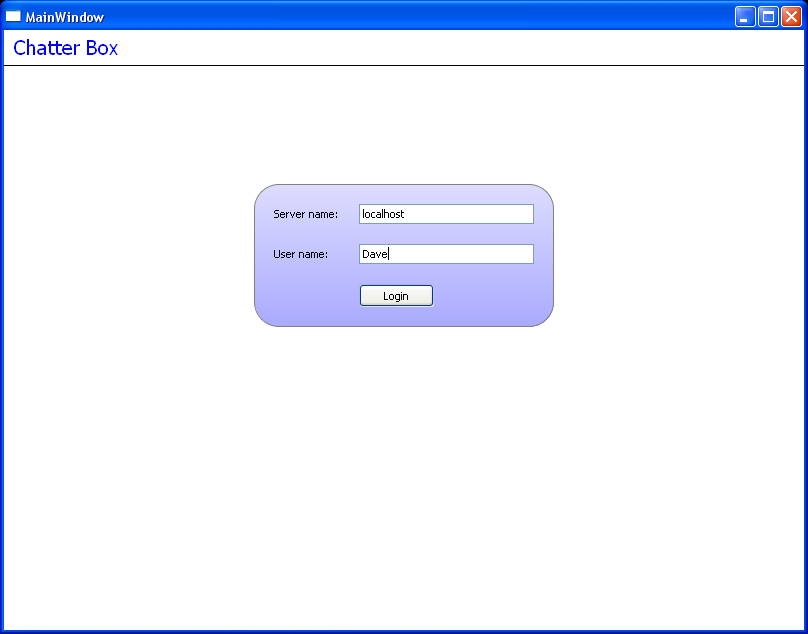
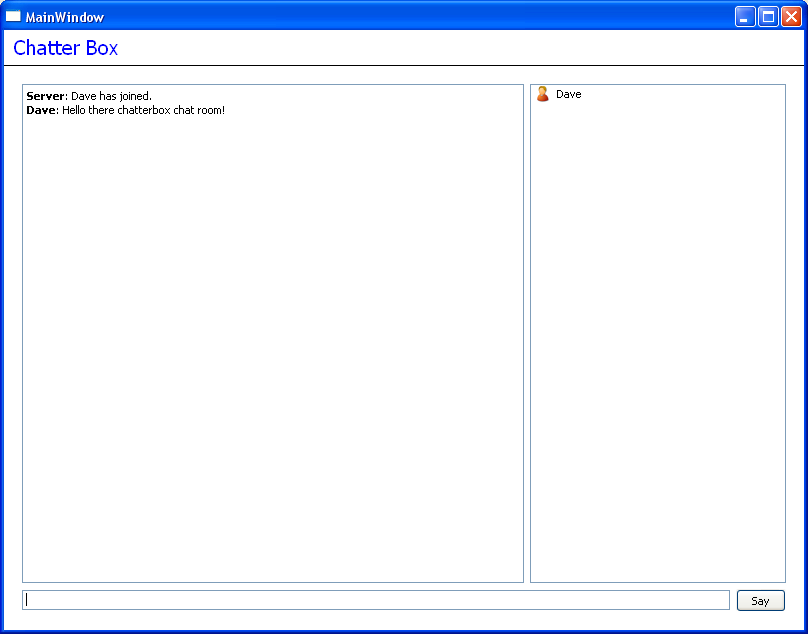
Here’s what the client looks like when you run it:
Getting Help
If you can’t get this to build or are running into some other problem, just leave a comment below, and I’ll get to it as soon as possible.
88 comments to “Example Qt Chat Program”
Thank You Dave….
Hi.. tnx Dave!!!!! :)
I read this code, but I’m trying to write it without designer!!!
but I have a big problem
how can I replace this in mainwindow.cxx
void MainWindow::connected()
{
// Flip over to the chat page:
stackedWidget->setCurrentWidget(chatPage);
// And send our username to the chat server.
socket->write(QString(“/me:” + userLineEdit->text() + “\n”).toUtf8());
}
in fact I dont know how open “chatpage” when I did’nt use designer??
You would have to instantiate a QStackedWidget in your C++ code, and add different widgets as pages to it. Each widget would probably be a QFrame with the content you want inside it.
This really is a lot easier to do with Designer if you can.
thanks very much,I try it…
I want it for university project,it must be without designer!!
maybe it is so easier for me to write it with UDP
but it can’t has log in facility…
It seems to me like you need to learn much more about UDP before you say something like UDP “can’t has log in facility”. That is simply not true.
Ok! so it maens it is possible whit UDP
surely I need to learn more about it
in fact I study math at university :)
could I continue discussion with you by email??
There is plenty of material on the internet on this topic. Please don’t correspond with me directly by email, as that would prevent others from benefiting from the conversation in the future.
Hey thtats really good…..
Can you tell me that is applicable with bluetooth
means can we create bluetooth chat application
Pratham: A bluetooth implementation would be very different, unless you could find a bluetooth abstraction layer that provides TCP for communicating between bluetooth devices.
Hi,
Thanks for your post,
I have a question
When I run ./chatterboxed, I have -> bash: ./chatterbox: Permission denied
I change permission by -> chmod +x chatterbox or chmod 777 chatterbox
but it dose not work again
help me please
./chatterboxed
chmod +x chatterboxed or chmod 777 chatterboxed
I wrote wrong in previous comment
My upper problem is solved, it runs, but it has error
Cannot retrieve debugging output!
hi !
can you help me ?
ex:
ip client 1: 192.168.1.10
ip client 2: 192.168.1.11
ip client 1: 192.168.1.12
i have 3 clients connect to server. but when send data to 3 clients
foreach(QTcpSocket *client, clients)
client->write(QString(“Server:” + client->peerAddress().toString() + ” mydata .\n”).toUtf8());
I only have one computer receives data (192.168.1.10)
i use wireshark to get tcp package
tcp package send to 192.168.11 and 192.168.12 is [tcp retransmission]
How do you resolve this situation does not ?
Hey. I’m just starting in Qt. I can not run the chat. Could you explain in more detail how to do?
Very well written example, very helpful and therefore easy to adapt to other projects.
I used it to implement a chat room to a client/server card game I made.
Thank you very much for your time!
Thank you very much and nicely detailed every step, for a quite newbie like me this is very helpful.
Thank you Dave!
Hi Devd i am not getting one header file … #include “ui_MainWindow.h” in this project .. please tell me the how can add the this file in project .
Hi Deve ,
i am trying u r example in my system but i am getting only one error for creation of socket .
1) when i am using #include file i am getting this error .. l
C:\Users\jayaraj\CHAT_projcet-build-desktop-Qt_4_8_1_for_Desktop_-_MinGW__Qt_SDK__Debug\..\CHAT_projcet\MainWindow.h:6: error: QTcpSocket: No such file or directory
2) when i am using this #include file i am gettin this error
C:\Users\jayaraj\CHAT_projcet-build-desktop-Qt_4_8_1_for_Desktop_-_MinGW__Qt_SDK__Debug\..\CHAT_projcet\MainWindow.cxx:9: error: undefined reference to `_imp___ZN10QTcpSocketC1EP7QObject’
for both condition i am not getting the slowing the problem please tell me what can i do , give me some suggestion …
Thanks and Regards
Govind Rao
India
Hi Deve ,
sory privous one is not correct
i am trying u r example in my system but i am getting only one error for creation of socket .
1) when i am using include QTcpSocket file i am getting this error .. l
C:\Users\jayaraj\CHAT_projcet-build-desktop-Qt_4_8_1_for_Desktop_-_MinGW__Qt_SDK__Debug\..\CHAT_projcet\MainWindow.h:6: error: QTcpSocket: No such file or directory
2) when i am using this include QTNetwork/QTcpSocket file i am gettin this error
C:\Users\jayaraj\CHAT_projcet-build-desktop-Qt_4_8_1_for_Desktop_-_MinGW__Qt_SDK__Debug\..\CHAT_projcet\MainWindow.cxx:9: error: undefined reference to `_imp___ZN10QTcpSocketC1EP7QObject’
for both condition i am not getting the slowing the problem please tell me what can i do , give me some suggestion …
Thanks and Regards
Govind Rao
India
Govid: Your might be missing this line in your .pro file:
QT += network
Good luck.
Hi Deve ,
sory privous one is not correct
i am trying u r example in my system but i am getting only one error for creation of socket .
1) when i am using include QTcpSocket file i am getting this error .. l
C:\Users\jayaraj\CHAT_projcet-build-desktop-Qt_4_8_1_for_Desktop_-_MinGW__Qt_SDK__Debug\..\CHAT_projcet\MainWindow.h:6: error: QTcpSocket: No such file or directory
2) when i am using this include QTNetwork/QTcpSocket file i am gettin this error
C:\Users\jayaraj\CHAT_projcet-build-desktop-Qt_4_8_1_for_Desktop_-_MinGW__Qt_SDK__Debug\..\CHAT_projcet\MainWindow.cxx:9: error: undefined reference to `_imp___ZN10QTcpSocketC1EP7QObject’
for both condition i am not getting the slowing the problem please tell me what can i do , give me some suggestion …
Thanks and Regards
Govind Rao
India
Hi Deve ,
Thanks for replay … now my code is working ……
My self Govind Rao i am very intrest to work on QT. if i get any problem please help me ..
Thank you very much …..
Thanks and Regards
Govind
India
Hi Deve,
i am getting error what can i do please tell me … solution .
error: expected initializer before ‘QtCoreModule’
Hi Dave ,
if i need the multiple chat like google-talk chat , we need chat list , if we click on chat list one chat box will pops up ,this type projects. How do i resolve this situation ?
OMG! Dave!
I don’t know how to thank you..!!
The exact source I was lookin for!!!
Thanks very much Dave!
Really a great work and easy to understand, because of your comments!
– nik
I would like to run the same program in QT3.0…..Because I have a linux set-top-box and it has QT3.0 supported.
Is it possible to convert form QT4.3 to Qt 3.0?
Please help
Neha: Sure, it’s possible. I wouldn’t recommend it though.
Hi Dave,
is it possible for you to upload a commentet version of the server? Unfortunatly i cant really follow some of the code :/
– Arne
hi,,, this program works only on localhost?
Hi to all…I need to have chat application and sending commands{encrypted codes} in the same socket. I was trying to create new socket and implement it in the same code but it was not possible. I wrote two sockets in both client/server application. program server application was hanging on PC, suggested to close bcoz of listening/connecting two times to the server.
How to address this issue.Whether two or more sockets with ports can be connected to same server to send different datas Or any tagging should be done before writing into socket such while decoding at remote end it will classify this info for whom.. means lineEdit1(chatting msg) or for LineEdit2(commands)..
I need a program in qtcreator for a test. A program is a chat with udp comunnication simple no complicate… thank for your time if you can help me
Hi Dave!
I am using Qt 5, however Qt5 cannot include the file QMainWindow so I can not build your code.
Please help!
Thanyou for your time!
Hi Dave! Thanks for this just started using Qt5 and this has been a good starting place. Just a quick question would you say this is a gossip protocol?
A few quick fixes I had to make on my system for this to run were:
1. sudo apt-get install qt4-qmake
2. sudo apt-get install libqt4-*
For some reason my initial install from the Qt page was not completed properly. This should help with any ‘ no such file or directory’ errors.
Hello Dave,
one error in your program , executable file missing
Executable C:\Users\3D WORLD\Downloads\Compressed\chatterboxd\build-chatterboxd-Desktop_Qt_5_4_0_MSVC2013_OpenGL_32bit-Debug\debug\chatterboxd.exe does not exist.
QmainWindow not found ??
any suggetions ?
pkb: For Qt5, add
QT += widgets
pkb: For Qt5, add
QT += widgets
to your .pro files