Best bash prompt. Ever.
I have the best bash prompt ever. It took a lot of hacking and googling, but here she is:
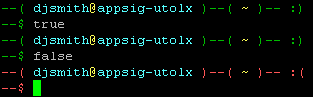
Notice that the smiley face and text colors change depending on the exit code of the last run command (red = failed, green = happy). This is handy, for example, after a big long build that has error messages buried in it, and the last line of output just isn’t that useful.
To make your prompt awesome, put this in your .bashrc and enjoy:
Happy bashing!
13 comments to “Best bash prompt. Ever.”
Does your version of bash handle the wrapping ok when you do this? I used to have color on my input line and finally gave up. My current prompt is this:
This gives me a little color, which makes finding previous prompts easy when scrolling up, and the return status is there in yellow if it’s not 0. But no color on the actual input line, and also the longest input line possible, and so I have minimal issues with different versions of bash and their myriad wrapping bugs.
Yeah, my bash does handle the wrapping. However, if yours does not, you can just put all that “export PS1” stuff on a single line.
For users of git I recommend a slight modification. This adds the current git branch when you’re in a git controlled directory. It’s not as elegant (multiple echo’s) but more awesome.
export PS1="\`if [ \$? = 0 ]; then echo -en '$GREEN--( $LIGHT_CYAN\u$YELLOW@$LIGHT_CYAN\h$GREEN )--( $YELLOW\w$GREEN )--( $PURPLE'; __git_ps1 "%s"; echo -n '$GREEN )-- :)\n--\$$DEFAULT_COLOR '; else echo -en '$LIGHT_RED--( $LIGHT_CYAN\u$YELLOW@$LIGHT_CYAN\h$LIGHT_RED )--( $YELLOW\w$LIGHT_RED )--( $PURPLE'; __git_ps1 "%s"; echo -n '$LIGHT_RED )-- : (\n--\$$DEFAULT_COLOR '; fi; \`"I would like to prompt your bash.
It’s not so bad, especially the coloring by exit-code.
However, you might want to do something like: user@host:cwd (that is, put the current directory next to the host). Then you can use the whole string as an ssh/scp target/source…
Also, coloring the username differently depending on being root or not can really save you :)
This is great, totally using it. :)
Saw it, used it (with modifications), love it. Bonta-kun’s suggestion is great.
Great tip, thanks. I love your blog!
I’m using it with some modifications (root in red, full path, shows svn revision):
export PS1='`if [ \\$? = 0 ]; then echo -e "33[0m[$(test \u = root && echo 33[31mroot33[0m || echo \u)@\h $(pwd) $(svn info 2>&1 | grep Revision &> /dev/null && (echo -n "33[1;34m" ; echo -n $(svn info | grep Revision:) ; echo -n "33[0m"))]33[32m\$33[0m "; else echo -e "33[0m[$(test \u = root && echo 33[31mroot33[0m || echo \u)@\h $(pwd) $(svn info 2>&1 | grep Revision &> /dev/null && (echo -n "33[1;34m" ; echo -n $(svn info | grep Revision:) ; echo -n "33[0m"))]33[31m\$33[0m "; fi; `'For what it’s worth, I tend to avoid using the ASCII escape codes directly, preferring code such as “blue=$(tput setaf 4 2) instead. According to http://mywiki.wooledge.org/BashFAQ/037 and http://bash-hackers.org/wiki/doku.php?id=scripting:terminalcodes the tput method is preferred, though I can’t think of an instance in which either method caused a serious problem for me.
@willdye
For the specific ANSI codes, there is no real technical reason. tput setaf/setab produce ANSI codes per definition (setaf – “set ANSI foreground”).
It gets interesting for all other codes that are not ANSI specific or defined in ANSI but may be implemented differently in your terminal (maybe a better version of it, or similar). What tput improves is the code readability, even for ANSI color codes. Direct ESC sequences look crazy in the code, compared to a $(tput ….).
This is both awesome and horrible
It’s handsome because I too like to have a visual clue to point my old a deficient brain to a compile error
It’s horrible because it combines the export and the test, rendering the code so obfuscated that any editor syntax parser will choke on it (let alone a human) and colorize it wrongly.
I’d really like to find a workaround ; The catch is that the test must be done late, otherwise you might get return codes of another command, if not the test itself.
I tried putting the test in a function, and then calling COMMAND_PROMPT=myfunction but I could not get it to work. Any help ?
anyway, i like it. Thanks Dave.
I mean, this *should* work. But it does’nt :(
PS1=”$(if [ $? = 0 ] ; then echo “:)” ; else echo “:(“; fi) # “
I think I finally figured it out :
http://www.box.net/shared/kxauj9ezym
Thank you very much for this smiley idea, I think it’s a great ergonomic improvement.